요약
Introduction
Hi, we’re Denny (Donghee) and Elvin (Subin) from Karrot’s Python Chapter. At Karrot, we have Chapter groups where members interested in specific programming languages voluntarily come together to discuss company-wide policies and ecosystem issues for that language. There are chapters for several languages including Go and Ruby, and the Python Chapter is one of them.
This post shares the process by which the Python Chapter discussed supply chain security issues and actually applied the solution to our internal infrastructure. We hope it will be helpful to others facing similar concerns.
How It Started: The LiteLLM Supply Chain Attack
On March 24, 2026, the LiteLLM PyPI package, widely used as an LLM proxy library, suffered a supply chain attack.
Here’s how the attack unfolded:
- LiteLLM was running a security scanner called Trivy in its CI/CD pipeline for security purposes.
- The attacker stole the credentials for Trivy that LiteLLM was using in its CI/CD.
- Using the stolen credentials, they bypassed the official CI/CD pipeline and uploaded packages containing malicious code (1.82.7, 1.82.8) directly to PyPI.
- These versions contained payloads that exfiltrated environment variables, SSH keys, and cloud credentials to external servers.
The malicious packages were quarantined by PyPI relatively quickly, but a significant number of downloads occurred even during that short window. Around the same time, the telnyx package was also targeted in the same manner.
Why Cooldown?
Such supply chain attacks share a common pattern: the exposure window between when a malicious package is uploaded to PyPI and when it’s detected and quarantined is short.
According to William Woodruff’s analysis (We should all be using dependency cooldowns), eight out of ten recent major supply chain attacks had exposure windows of less than a week. A 14-day cooldown would have prevented nine of those.
The idea itself is simple: don’t install packages right after they’re uploaded to PyPI — wait a few days. Since it takes time for malicious packages to be detected and quarantined, the problem is installing them before that happens.
Some tools support this natively:
- uv: exclude-newer = "P3D" setting excludes packages uploaded within the last 3 days
- pip: -uploaded-prior-to flag
Karrot’s Internal PyPI Proxy
At Karrot, we use AWS CodeArtifact to distribute and manage internal libraries in PyPI format. To make it easier for members to use, we operate an internal PyPI proxy server.
Why a Separate Proxy Was Needed
Exposing the CodeArtifact endpoint directly works fine for receiving packages. However, doing so requires preparing AWS credentials in every environment, then issuing a token each time and inserting it into the URL.
For example, to use uv locally, you'd need environment variable setup like this:
$ export UV_INDEX="<https://aws>:$(
    aws codeartifact get-authorization-token \
        --domain xxxx-yyyy \
        --domain-owner <AWS_ACCOUNT_ID> \
        --query authorizationToken \
        --output text
)@xxxx-yyyy-<AWS_ACCOUNT_ID>.d.codeartifact.us-west-2.amazonaws.com/pypi/xxxx-yyyy/simple/"
You just wanted to install a Python package, but you had to install awscli, have valid AWS credentials in your shell, and manually insert a token from get-authorization-token into the URL. Since tokens expire after a certain period, longer work sessions meant running the same command again.
Dockerfiles became even more complex. You had to install awscli in the build stage, inject AWS credentials as ARG at build time, then use those credentials to issue a token and insert it into the dependency installation command.
# Injecting credentials at build time, not recommended for security
ARG AWS_ACCESS_KEY_ID
ARG AWS_SECRET_ACCESS_KEY
RUN apt-get update \
    && apt-get install -y --no-install-recommends git \
    && rm -rf /var/lib/apt/lists/* \
    && uv pip install awscli
RUN UV_INDEX="<https://aws>:$(aws codeartifact get-authorization-token \
        --domain xxxx-yyyy \
        --domain-owner <AWS_ACCOUNT_ID> \
        --query authorizationToken \
        --output text)@xxxx-yyyy-<AWS_ACCOUNT_ID>.d.codeartifact.us-west-2.amazonaws.com/pypi/xxxx-yyyy/simple/" \
    uv pip install .
CI pipelines required separate procedures to exchange AWS credentials via OIDC or secrets. Since authentication methods differed across environments, the guide documentation grew long, and if a newly joining colleague missed a setting somewhere, it would lead to installation failures.
So we wanted to keep the benefits of the managed CodeArtifact service while preserving the familiar PyPI experience from the user’s perspective.
Solving It with a Thin Proxy Layer
The solution is simple: place a thin proxy layer in front of CodeArtifact that receives client requests and forwards them straight to the CodeArtifact endpoint. The user-side configuration becomes just this single block:
# pyproject.toml
[[tool.uv.index]]
name = "karrot-pypi-proxy"
url = "https://<proxy-host>/simple"
default = true
The same single line of configuration works in any environment (local, CI, Dockerfile), and there’s no need to inject AWS credentials anywhere. Since it routes PEP 503’s Simple Repository API paths (/simple/{package}/, /simple/{package}/{version}/{file}, etc.) as-is, client tools like pip or uv think they're communicating with a regular PyPI Index.
When a request comes in, the proxy attaches a fresh authentication header for CodeArtifact and forwards it. To avoid loading large binaries like wheel files entirely into memory, we implemented streaming responses delivered in chunks (8KB).
AWS Token Management in the Proxy
CodeArtifact authentication tokens expire after a certain period once issued. To prevent users from having to handle tokens directly every time, the proxy needs to take responsibility for this lifecycle. So when the application starts, we spin up a background daemon thread that periodically checks the expiration time and automatically renews the token. The issued token is protected by a threading.Lock and shared across all request handlers.
We added two operational details. First, we issue tokens with the shortest lifetime boto3 allows — 900 seconds (15 minutes) — and pre-renew 300 seconds before expiration. Issuing them with short lifetimes reduces exposure time if a token leaks somewhere. Second, we add ±60 seconds of jitter to the renewal timing. This was to avoid multiple instances trying to renew at exactly the same time and overloading the CodeArtifact API.
So that you can assume the token is always alive when the server is operating normally, the /health endpoint doesn't simply check whether the process is alive—it also verifies the validity of the current token. If renewal continuously fails for some reason, the health check returns 503 and the server is restarted.
A Natural Single Entry Point
Because all this processing happens inside the proxy, users can simply run pip install or uv sync as usual, regardless of environment. As a side effect, this naturally created a structure where all internal Python package installation traffic flows through this single proxy. We could observe at a glance which packages were being downloaded and how often through Prometheus metrics. Moreover, this single entry point became the starting point that allowed us to introduce the cooldown policy this time.
As mentioned earlier, you can also configure cooldowns in client tools like uv or pip. But realistically, it’s not easy to enforce this across every internal member’s local environment and CI configuration. Inevitably, someone will miss a setting, or forget to apply it when starting a new project.
The proxy is different. Since all Python package requests flow through this proxy, applying the cooldown policy once at the proxy layer means a consistent security policy is applied across the entire company, regardless of client tools or personal settings.
The Challenge: Between PEP 503 and PEP 691
But when we actually started implementing the cooldown policy, an interesting problem emerged.
PEP 503: HTML-Based Simple Repository API
Package managers like pip and uv request package lists according to the Simple Repository API specification defined by PEP 503. This API returns an HTML page at the /simple/{package}/ URL for each package, with each file listed as an <a> tag.
<!-- /simple/litellm/ -->
<!DOCTYPE html>
<html>
  <body>
    <a href="...">litellm-1.82.6-py3-none-any.whl</a>
    <a href="...">litellm-1.82.7-py3-none-any.whl</a>  <!-- malicious version -->
    <a href="...">litellm-1.82.8-py3-none-any.whl</a>  <!-- malicious version -->
    <a href="...">litellm-1.83.0-py3-none-any.whl</a>
  </body>
</html>
The problem is that this HTML doesn’t contain upload time information. There’s no way to determine which files were uploaded within the cooldown period.
PEP 691: JSON-Based Simple API
PEP 691 is a spec that provides the same Simple API content as PEP 503 in JSON format. By sending the Accept: application/vnd.pypi.simple.v1+json header, you can receive a JSON response.
{
  "name": "litellm",
  "files": [
    {
      "filename": "litellm-1.82.6-py3-none-any.whl",
      "upload-time": "2026-03-22T06:35:56.795579Z"
    },
    {
      "filename": "litellm-1.82.7-py3-none-any.whl",
      "upload-time": "2026-03-24T14:21:00Z"  // malicious version (quarantined, upload time estimated)
    },
    {
      "filename": "litellm-1.82.8-py3-none-any.whl",
      "upload-time": "2026-03-24T14:35:00Z"  // malicious version (quarantined, upload time estimated)
    },
    {
      "filename": "litellm-1.83.0-py3-none-any.whl",
      "upload-time": "2026-03-31T05:08:21.987889Z"
    }
  ]
}
The JSON response includes an upload-time field for each file. Using this field, we can accurately calculate cooldown criteria.
Leveraging Both Specs Together
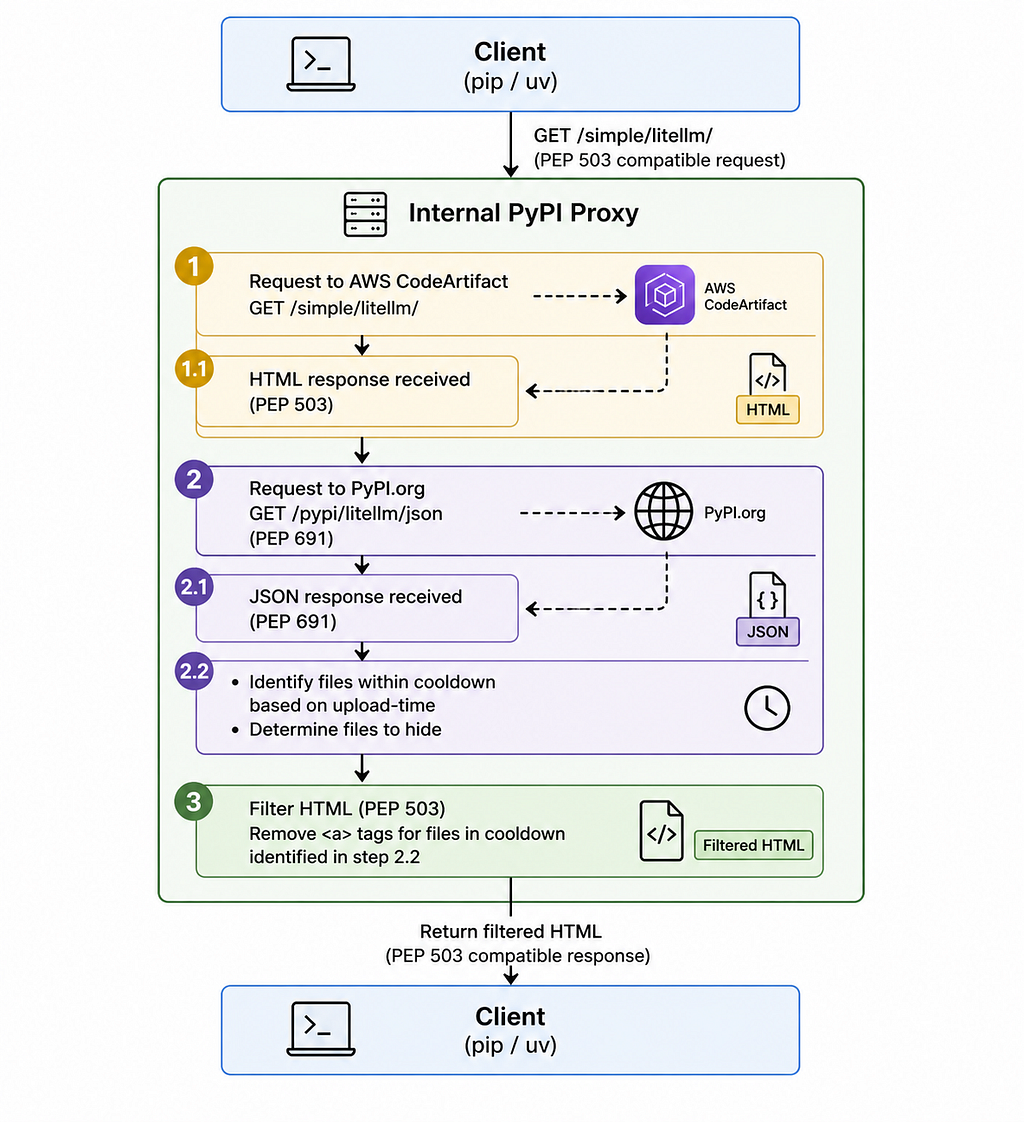
To solve this problem, we chose a structure where clients (pip, uv) are served PEP 503 HTML responses, while filtering decisions are made via the PEP 691 JSON API. The overall flow is shown below.
A Look at the Implementation
Applying the Cooldown Filter
When a package list request comes in, the proxy does two things simultaneously. It receives the PEP 503 HTML response from CodeArtifact, and also requests the same package’s PEP 691 JSON from pypi.org. Based on the upload-time in the JSON response, it identifies files uploaded within the cooldown period, then removes those file links from the CodeArtifact HTML. The filtered HTML is delivered to the client as the final response.
Dynamic Control via Central Dogma
The cooldown policy is dynamically managed through our internal configuration management system, Central Dogma. Without redeploying the server, we can enable/disable cooldowns, adjust the number of days applied, or make exceptions for specific packages.
Applying cooldowns to all packages isn’t realistic. There’s no reason to wait several days for internal libraries that Karrot manages directly, or for highly trusted libraries that have been validated over a long period. So we maintain an exclude list, and packages registered there can receive the latest version immediately without cooldowns. This setting is also reflected in real time through Central Dogma.
{
  "cooldown": {
    "enabled": true,
    "duration_days": "x", // not disclosed for security reasons
    "exclude": [
      "karrot-internal-package", // internal library
      "boto3"                    // highly trusted external library
    ]
  }
}
Is Cooldown Alone Enough?
Cooldown is an important defense layer against supply chain attacks. However, we’re aware of some limitations as well.
- Delayed security patches: Versions that fix vulnerabilities can also fall under the cooldown. So we need a process to quickly add packages requiring urgent updates to the exclude list.
- Existing malicious packages go undetected: Packages already uploaded before the cooldown period cannot be blocked. This is why running dependency audit tools in parallel is important.
Closing Thoughts
After introducing the cooldown policy, a similar supply chain attack actually occurred again. On April 30, 2026, PyTorch Lightning (pytorch-lightning 2.6.2, 2.6.3), widely used as a machine learning framework, was targeted as part of the same attack campaign (Mini Shai-Hulud). At Karrot, thanks to our internal cooldown policy, those versions could not be downloaded through the proxy.
Supply chain attacks are becoming increasingly sophisticated. To the extent that we trust the open source ecosystem, we need to actively respond to its threats as well. Karrot’s Python Chapter introduced a cooldown policy to our internal PyPI proxy in response to this LiteLLM incident.
Considering “when to install” along with “what to install” — we believe that’s an important first step toward using the Python ecosystem more safely.
The Python Chapter will continue discussions to make Karrot’s Python ecosystem safer and more productive.
Together with the Python Chapter members 📸

References
- LiteLLM Security Update — March 2026
- Incident report: LiteLLM and Telnyx supply chain attack — PyPI Blog
- We should all be using dependency cooldowns — William Woodruff
- PEP 503 — Simple Repository API
- PEP 691 — JSON-based Simple API for Python Package Indexes
How We Protect Karrot’s Internal PyPI Proxy from Supply Chain Attacks was originally published in 당근 테크 블로그 on Medium, where people are continuing the conversation by highlighting and responding to this story.