요약
Microsoft now says it's preparing a big update for File Explorer that would allow it to run faster, address 'white flashes,' and more.
본문
Home Windows 11
Microsoft promised that it’ll steer Windows 11’s development in the right direction by scaling back Copilot integration and focusing on core components. What’s more ‘core’ than File Explorer? Microsoft now says it’s preparing a big update for File Explorer that would allow it to run faster, address ‘white flashes,’ add new archive support, and more.
Microsoft has rolled out Windows 11 Build 26200.8313 to testers in the Release Preview Channel, and I’ve been testing it for the past 24 hours.
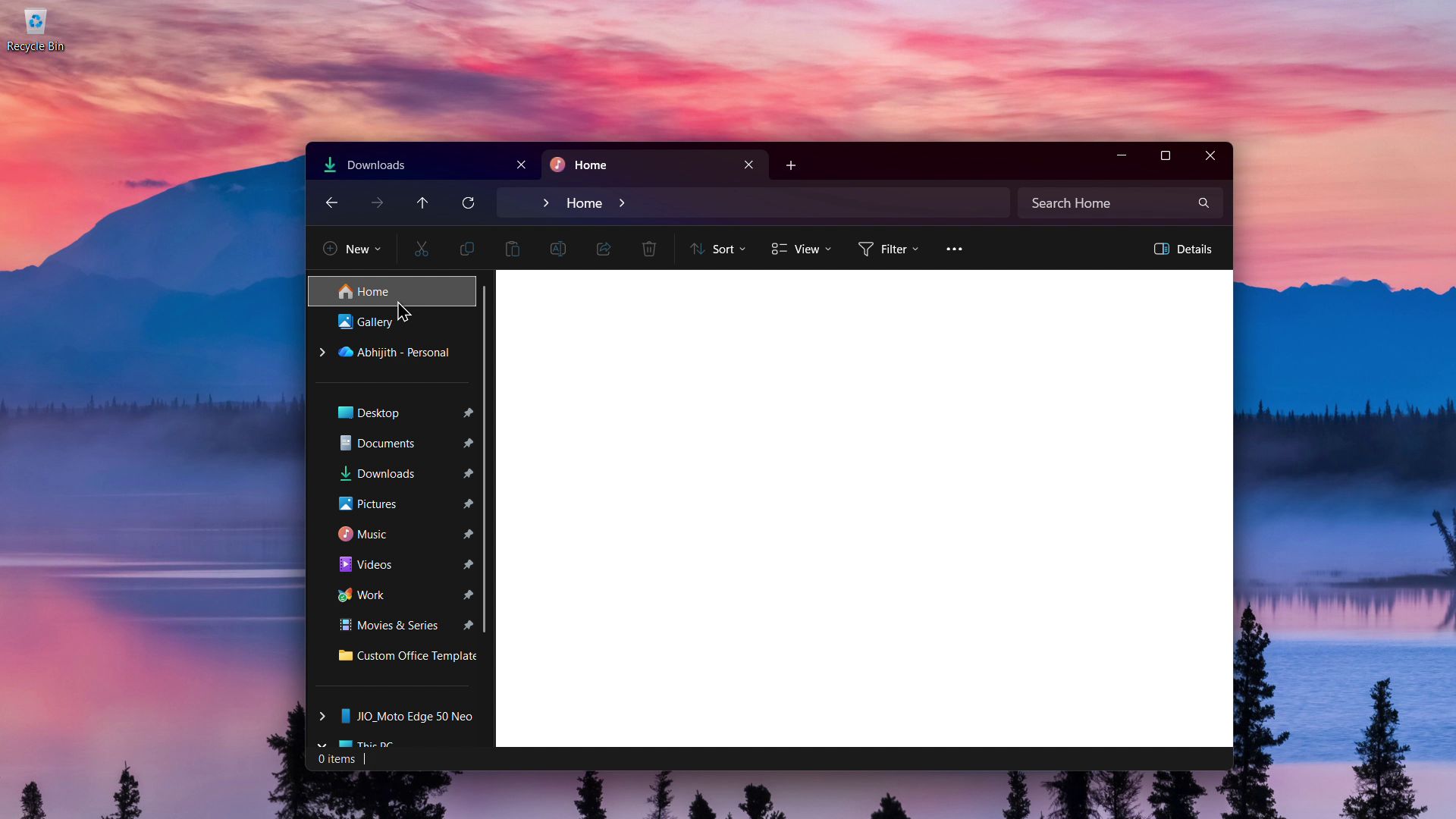
In our tests, Windows Latest observed that File Explorer is in better shape than before, as it loads faster and no longer flashes a white background in dark mode.
Build 26200.8313 is only available for Windows Insiders, but all changes in this update will become available to the general public with the April 2026 optional update. If you don’t install monthly optional updates, you’ll get faster File Explorer and all other fixes, including more reliable folder views, in the May 2026 Patch Tuesday update.
Windows 11 May 2026 Patch Tuesday update is scheduled for May 12, 2026, and it’ll begin rolling out at 10 AM PT.
File Explorer feels faster and no longer causes white flash in dark mode
In our tests, Windows Latest observed that File Explorer feels faster, especially when you launch it for the first time after booting to the desktop.
Right now, File Explorer is a big mess on low-end hardware, and it’s quite evident in the recording below.
https://www.windowslatest.com/wp-content/uploads/2026/04/File-Explorer-slow.mp4File Explorer takes a couple of seconds to finish loading, and that happens on the second or third attempt as well.
Thankfully, File Explorer is now a bit faster in the preview builds, and it’s not due to preloading that Microsoft previously tested for File Explorer. Preloading means File Explorer would launch automatically in the background to reduce load time.
In this case, it looks like Microsoft has made File Explorer itself faster, not just in performance, but also in how it handles Windows 11 themes.
I use File Explorer in dark mode, and I’ve configured it to open with the ‘This PC’ tab, not the default ‘Home’ tab, because it’s faster that way. However, if File Explorer is set to open ‘This PC’ in dark mode, you’ll notice white flashes when you open it, create new tabs, or switch folders from the This PC view.
https://www.windowslatest.com/wp-content/uploads/2026/04/File-Explorer-flashes.mp4You’ll also experience a white flash when you try to resize File Explorer’s Details pane.
The good news is that Microsoft has finally managed to patch these white flashes when File Explorer is in dark mode. The fix is included in Windows 11 Build 26200.8313 or newer.
Moreover, Microsoft is adding support for new archive formats. This means you can now right-click on file formats like xar and nupkg (NuGet packages) to extract their content. The full list of newly supported archive formats includes cpio, uu, xar, and nupkg.
Microsoft says it’ll add more archive support and improve performance in a future update.
Explorer.exe no longer crashes as frequently as it did in the past
Microsoft has improved the reliability of explorer.exe-related processes, and it could actually make Windows 11 more stable.
When you interact with File Explorer and suddenly close its window, the explorer.exe process won’t take a hit. Right now, sometimes, when closing File Explorer or booting Windows, the taskbar and system tray flyouts start crashing or lagging, largely due to explorer.exe issues.
This week’s preview update should make interacting with taskbar flyouts and even Task View more reliable. In fact, Microsoft confirmed that unpinning items from File Explorer’s Quick Access menu is more reliable after the update
In addition to all these performance improvements, Microsoft is adding the following features to File Explorer:
- Ability to preview internet downloaded files by clicking ‘Preview anyway.’
- The search bar in File Explorer now uses the same iconography as the rest of Windows 11.
- Right now, if you set a certain folder view, such as adjusting it by icon size, it reflects immediately. But when you access the same folder/path from another app, such as Microsoft Edge, Windows ignores your preferences and goes back to the default filters for sorting. This has now been fixed.
It’s all part of Microsoft’s efforts to make Windows a better operating system, and as expected, it’s not just words.
Microsoft is actively testing these improvements, and most changes highlighted above will begin rolling out in May 2026.
Add as preferred source Support on Ko-Fi Support on Patreon Ask a question (Forum)Mayank Parmar is an entrepreneur who founded Windows Latest. He is the Editor-in-Chief and has written on various topics in his seven years of career, but he is mostly known for his well-researched work on Microsoft's Windows. His articles and research works have been referred to by CNN, Business Insiders, Forbes, Fortune, CBS Interactive, Microsoft and many others over the years.
RELATED ARTICLESMORE FROM AUTHOR

Microsoft is going after every part of Windows 11’s legacy UI in major design update

Microsoft teases new customization features for Windows 11’s Start menu after years of criticism
Microsoft confirms Windows 11 speed boost for May with faster clipboard, startup apps, Explorer, and more
Microsoft confirms Windows 11 KB5083769 issues, BitLocker alert on a few PCs, and multiple reboots for installation

Windows 11 finally fixes inconsistent folder views in File Explorer
Microsoft confirms AI agents are still coming to the Windows 11 taskbar as it prepares for public rollout
Windows 11
Microsoft is going after every part of Windows 11’s legacy UI in major design update
Mayank Parmar - April 20, 2026 0
Microsoft teases new customization features for Windows 11’s Start menu after years of criticism
April 20, 2026
Microsoft confirms Windows 11 speed boost for May with faster clipboard, startup apps, Explorer, and more
April 19, 2026
Microsoft confirms Windows 11 KB5083769 issues, BitLocker alert on a few PCs, and multiple reboots for installation
April 19, 2026
Windows 11 finally fixes inconsistent folder views in File Explorer
April 18, 2026Windows 10
Windows 10 KB5078885 out with a GPU fix, Secure Boot 2023, direct download links for offline installers (.msu)
Mayank Parmar - March 11, 2026 0
Windows 10 KB5075912 ESU out with shutdown bug fix, direct download links for offline installer (.cab)
February 11, 2026
Windows 10’s extended support ends in eight months, but users are still rejecting Windows 11, at least in Germany
January 27, 2026
Windows 10 KB5073724 is January 2026’s Extended Security Update (ESU) and it removes old modem drivers
January 14, 2026